
32GB RAM in a NAS Rated for 16
, 4 min read
ASUSTOR rates this NAS for 16GB of memory, and mine has run on 32GB without complaint. This is the rest of the hardware inside, and how lucky I got with the timing of buying it.
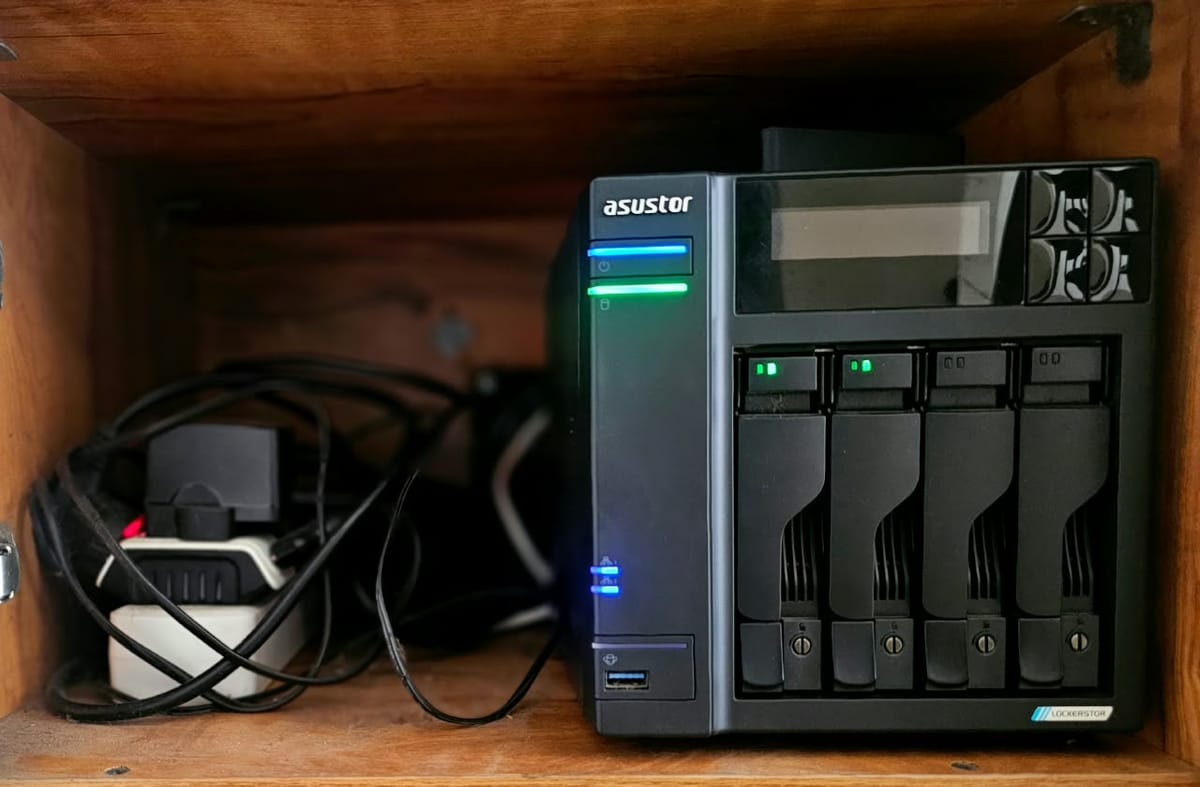
In part one, the NAS mostly sat on a shelf. This is what's inside it now, and very little of it came in the box.
It's an ASUSTOR Lockerstor 4 Gen2, bought in September 2024. It has four bays for hard drives, four M.2 slots, two 2.5 gigabit network ports and an Intel Celeron N5105, a low-power quad-core chip made for boxes that never switch off. It shipped with a single 4GB stick of memory, which is enough for storing files and not much else.
Twice the official limit
The 4GB stick was the first thing to go. ASUSTOR says this model takes 16GB at most, across two slots, so I put a 16GB Crucial DDR4 laptop stick in each. Published limits usually reflect what a manufacturer tested at launch rather than what the chip can address, and other owners had already reported 32GB working, so I went ahead. It booted, counted all 32GB, and hasn't had a memory problem since.
That memory is why this small box runs around twenty-five services at once. On 4GB, or even on the official 16GB, I would have had to choose.
Two drives for the price of one
The storage is two Seagate IronWolf Pro 16TB drives in a mirror, so every file lives on both and either drive can die without taking anything with it. That halves the space, but for family photos and a media library I would rather have 16TB I trust than 32TB I do not.
Both drives came from the US. NAS drives were so expensive in India that the price of one here bought two of the newer model there, so in effect the second drive was free.
The fast half
Two of the M.2 slots hold NVMe SSDs, a 2TB Crucial P3 Plus and a 500GB Silicon Power, striped as RAID 0 into a single 2.24TB volume. The R in RAID stands for redundant, and RAID 0 has none. If either SSD dies, the whole volume goes with it. I made my peace with that because everything that matters on the SSDs is copied to the mirror every night, so a dead SSD would cost me an evening of restoring and no data.
Lucky timing
The drives, the SSDs and the RAM were all bought while prices were still reasonable. The tinkering came later, well after memory and SSD prices had climbed sharply, so I got to enjoy the project without paying today's rates for it. The same build now would cost a great deal more, and I suspect I would have talked myself out of the RAM upgrade in particular. Of everything in this project, the timing is the one thing I did not plan.
Where the box runs out of road
For all the upgrades, the N5105 is still a low-power chip with modest integrated graphics. I found its ceiling in November 2025 when I tried to run a local AI model on it. That failed spectacularly, and it gets a post of its own.
Meanwhile my old desktop sits in the same house with an RTX 2060 inside, retired and doing nothing. I would dearly love to solder it onto the NAS somewhere. Since that is not how any of this works, the GPU will have to wait for a machine of its own.
The cabinet
We had a cat who would pee on anything with a vertical surface, so the NAS could not sit out in the open. It also had to be next to the router, so it went into a closed cabinet on the same shelf, a box full of fans shut inside another box with nowhere for the hot air to go.
I had already drilled a hole in the back of the cabinet for cables. Yup. I am a hardware guy. I own a drill and a set of circular bits. So I drilled a second hole, smaller than the fan I had, and stuck a USB PC fan over it. It spent its life pushing air through a gap narrower than itself while I watched the temperatures spike. The ultimate hack came next, a hole cut to the full frame of a proper cabinet cooling fan, mounted on a metal plate and running off its own adapter. For someone with no experience of any of this, it came out quite well.
The airflow is still a conundrum. The fan pulls air out of the cabinet, so air comes in wherever it can, brings the dust with it, and meets the NAS on the way. When I finally opened the cabinet after a few months, it was a Carnival of Dust, and I was no Poet. The only proper intake was the cable hole, full of dust and cat hair, and the fan itself was a dust fest.
The fan also faces the wall, a decision entirely my own. If I had ever studied fluid dynamics, the professor would renounce ever having taught me. The wall behind it went black, and a fan that blows into open space is probably the next upgrade.
For now, that is where it lives, on a shelf it shares with the Airtel modem (technically also a router, with its Wi-Fi switched off), the TP-Link router, two power backups, a calling bell wired to the router over LAN and, some days, an Ethernet extender. That shelf is a cable management massacre.
What's in the box
- NAS: ASUSTOR Lockerstor 4 Gen2, bought September 2024
- Processor: Intel Celeron N5105, quad-core, low power
- Memory: 2 × 16GB Crucial DDR4 laptop sticks, 32GB total (official maximum 16GB), rated 3200MHz, running at 2933MHz
- Hard drives: 2 × Seagate IronWolf Pro 16TB, mirrored, 16TB usable
- SSDs: Crucial P3 Plus 2TB and Silicon Power 500GB NVMe, RAID 0, one 2.24TB volume
- Slots in use: 2 of 4 drive bays, 2 of 4 M.2 slots
- Network: 2 × 2.5 gigabit Ethernet
- Cooling: FourDot 120mm cabinet fan on a six-inch plate, in a hole I drilled myself
- Retired: Electronic Spices 120mm USB fan
- On the shelf, not in the box: RTX 2060, still in the old desktop
Next up is the software: how everything is organised on the box, and why that organisation exists because I once took down the whole house's internet while someone was trying to work.