
Self-Hosting My Food Diary and Health Data
, 6 min read
I have been tracking food, steps and weight since April, and until now the data lived in an AI chat. This is how I moved it onto my own NAS with NutriTrace, what broke along the way, and why Kerala home cooking is the real problem with calorie tracking.
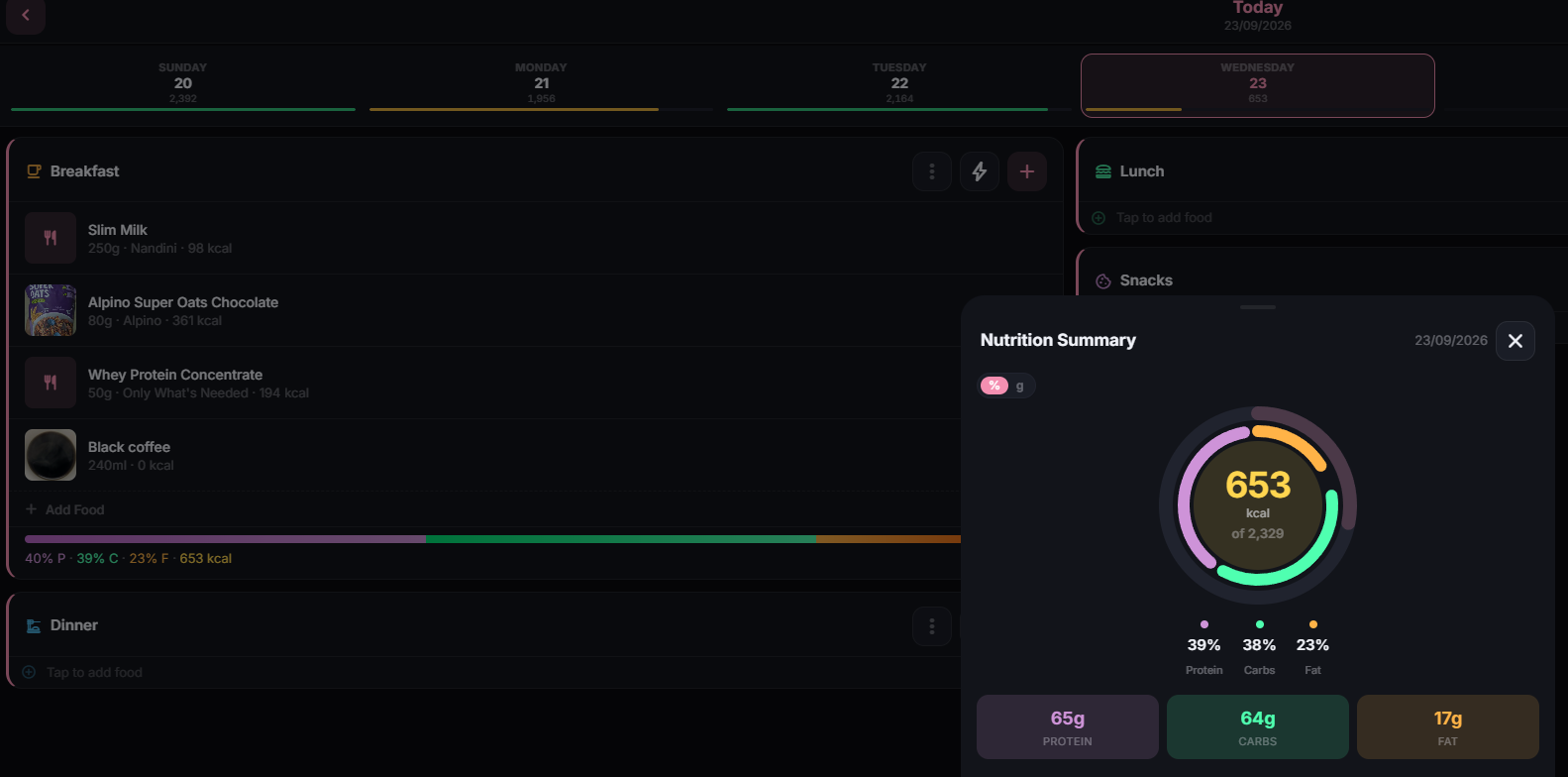
Since April I have been tracking what I eat, how much I walk and what my watch thinks I burn. For most of that time the system of record was a chat window. I would tell an AI assistant what I had for lunch, it would estimate the calories, and at the end of the day we would work out the deficit together and add a row to a table that kept growing.
It worked better than I expected, and it also had an obvious flaw. Months of my health data lived in a conversation history that could be truncated, lost or quietly reinterpreted. Every time I asked what my average deficit was in August, the answer depended on how well the model remembered a thread it was never designed to be a database for.
So the obvious next project for the Dungeon, the NAS that already runs my DNS, VPN, password manager, monitoring and this blog, was a proper home for that data.
What I wanted
The requirements were simple to state. I wanted a food diary with recipes, because most of what I eat is cooked at home. I wanted steps and calorie burn from my Samsung watch to arrive on their own, without me copying numbers across.
I also wanted AI to help with logging, since typing every ingredient into a food database is the reason most people give up on calorie tracking within a month. And I wanted the whole thing on my own hardware, because a daily record of what I eat and weigh is exactly the kind of data I would rather not hand to a subscription app that might change its pricing or its privacy policy next year.
Choosing the software
I looked at three options. wger is the mature, well-known one, but its real strength is gym programming. I run, cycle and play badminton, and my watch already records all of that, so most of what wger does best was not what I needed.
The second was a project called InTake, which ChatGPT got very excited about. Its API had exactly the shape I described, and the conversation quickly turned into plans for building an Android client, a Health Connect bridge and an MCP server on top of it. When I actually looked at the repository, it had one star, one developer and no commits since April. It had no food database, no phone app and no Health Connect support either, so everything that made it look perfect was work I would have had to do myself, on a project its own author had apparently stopped working on. I keep coming back to that exchange, because it is a good example of how an AI will enthusiastically build a plan on a premise nobody has checked.
The one I chose is NutriTrace. It runs as a single container with SQLite, has a native Android app that reads Health Connect, looks up foods in Open Food Facts and USDA, and includes an AI assistant that uses your own API key and reads your real diary through tool calls instead of guessing. It is young, maintained mostly by one person and moving fast, which is a risk I decided I could live with as long as I controlled when updates happened.
Things that did not go as planned
The first deployment failed immediately. I had pinned the image to version 1.3.1 because the project's deployment guide listed version tags, but the guide was out of date. The build pipeline only publishes latest and dev, and the maintainer recommends pinning by image digest instead. That is now what I do, which means updates happen only when I paste in a new digest, and never as a side effect of redeploying the stack for some unrelated reason.
The container then reported itself as unhealthy for a while, and I spent a few minutes assuming I had broken something. It turns out NutriTrace blocks every API route, including its own health check, until the first user account exists. The container was fine. It was just waiting for me to finish setup.
Where the service lives on my network also turned out to matter more than I expected. The app is only reachable at home or over my Tailscale network, never from the public internet, because a year of food and weight data is not something I want exposed to find out whether a login page holds up. The Android app handles that well. It keeps a full local copy on the phone, logs happily with no signal, and syncs everything once it can reach the NAS again.
The hard part is not the software
The real problem with calorie tracking in Kerala is that the databases do not know what we eat. Open Food Facts can tell me about a packet of biscuits, but not about appam, or chicken stew made with thick coconut milk, or the moringa thoran that turns up at our table every other week. An AI can guess, but a guess about stew depends on how much coconut milk and oil went in, and those vary from house to house. Weighing the food fixes the portion size, not what is in it.
So the plan is to build a library of our own dishes. I worked each recipe out once from the actual ingredients and added it as a food, and for now I log them by the serving, where a serving means a fraction of the pot. The next time I cook each one, I will weigh the finished pot and switch to values per 100 grams, which also accounts for the water that cooks off. Even the first pass was useful: checking the numbers showed a dal fry with almost no fat in it, which almost certainly means the oil in the tadka was left out of the calculation.
The AI's job becomes much smaller this way. It turns "two appams and some stew" into a list of items, and the app matches those items against my own recipes, so the numbers come from what I actually cook.
That had a side effect I did not expect, which is cost. NutriTrace's quick-log feature makes one short AI call to parse what I said and does the matching on the phone, so logging a meal costs a fraction of a cent. The full chat assistant is the expensive part, since every question can run several rounds of tool calls and resend the whole conversation, with no prompt caching to soften it. Knowing that changed how I use it. I log with quick-log, save the meals I eat regularly so they take one tap, and keep the chat for questions that actually need it.
Bringing the history across
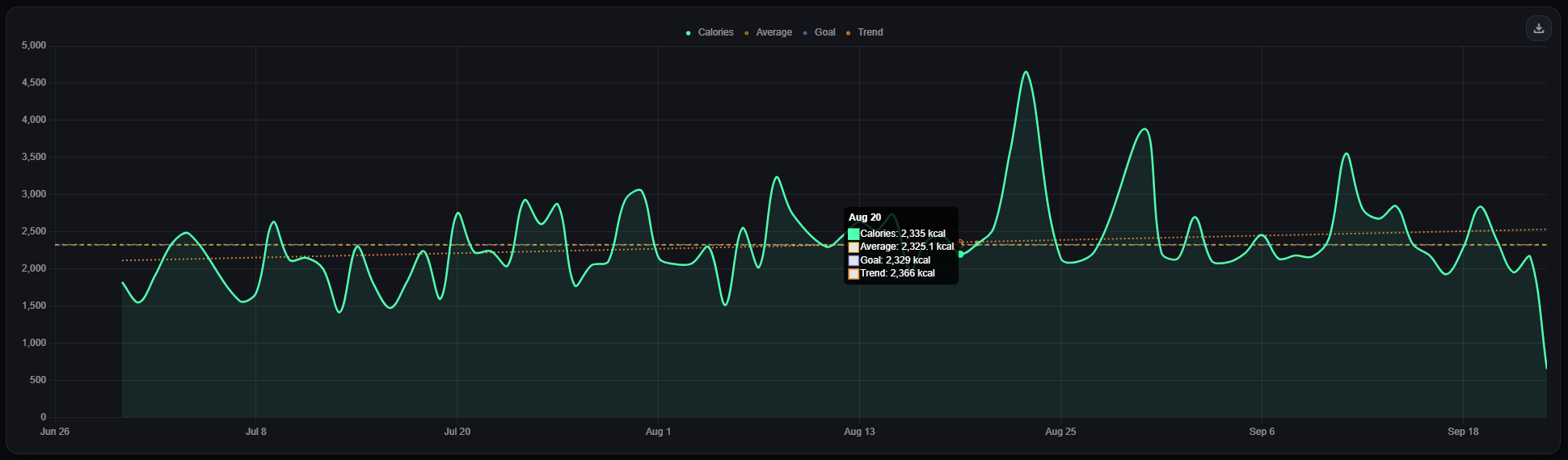
Moving five months of history out of that chat-built table took more cleanup than I would like to admit. Some intake figures were ranges, many values had a tilde in front, one day's log was clearly incomplete, and one row had been pasted under the wrong date. There was also a subtle trap. NutriTrace's importer reads a number like 2,146 as two point one four six, so leaving the thousands separators in would have quietly imported nonsense.
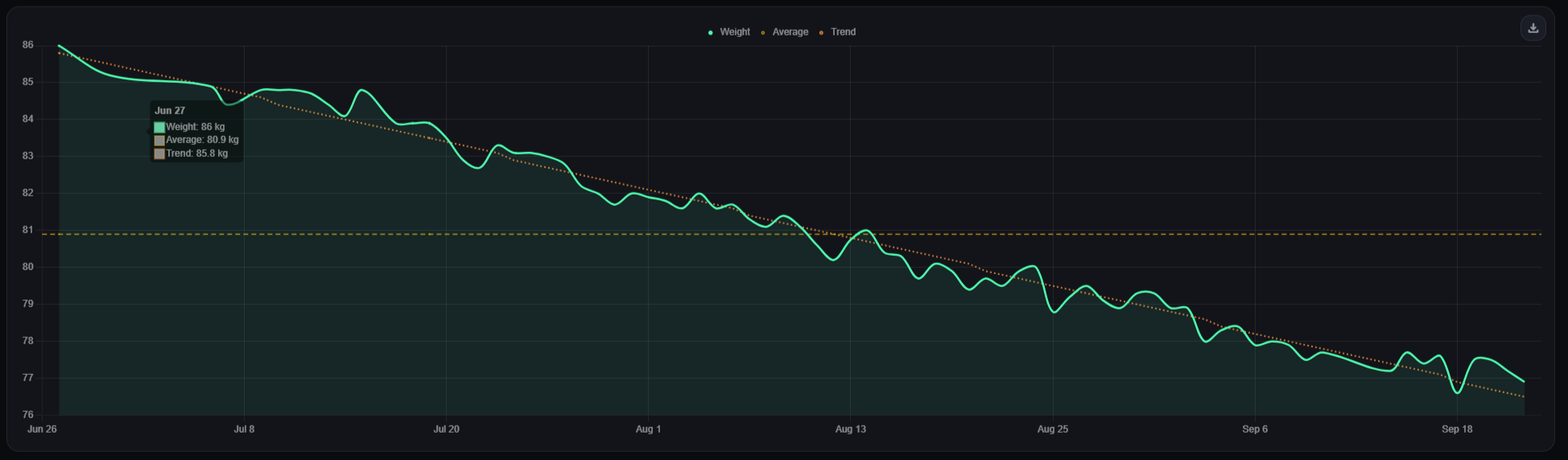
Once cleaned, the intake history went in through the spreadsheet importer as one daily total per day. Weight was a different story. None of the importers touch the body stats where weight lives, even when the file has a weight column, so the 81 weigh-ins going back to April had to go in through NutriTrace's REST API instead. I switched the write API on for a few minutes, created a short-lived token, and ran a small script that posted one weight per second to stay under the rate limit of 60 requests a minute. It took about a minute and a half, which felt painfully slow while I was watching it, and it finished with all 81 written and none failed. Then the API went back off and the token was deleted.
Steps from before the last month or so stay in a spreadsheet, since Health Connect only hands a newly connected app about 30 days of history. That turns out not to matter much. The part of NutriTrace that learns my actual energy expenditure only needs intake and weight, and it now has both from the start.
Where it stands
The server runs quietly in the Dungeon alongside everything else, the phone syncs in the background, and steps and calorie burn from the watch flow in through Health Connect without me touching them. More importantly, when I ask how the last month went, the answer comes from a database I own, not from a model trying to remember a long conversation.
The watch's body composition readings are only partly there. Samsung Health passes body fat, basal metabolic rate and weight on to Health Connect, but skeletal muscle and body water never leave Samsung's own app, so no third-party tracker can see them. NutriTrace also reads body composition for the current day only, so the older readings sitting in Samsung Health will need their own backfill at some point.
The open question is whether to let Claude read the diary directly over MCP. That means exposing something to the internet, and health data is where I am least willing to cut corners, so I have not made up my mind yet.