
Letting Claude Log My Meals and Watch Data Into NutriTrace
, 5 min read
I've logged every meal by chatting with Claude for months. Now the same chat writes straight into my own server.
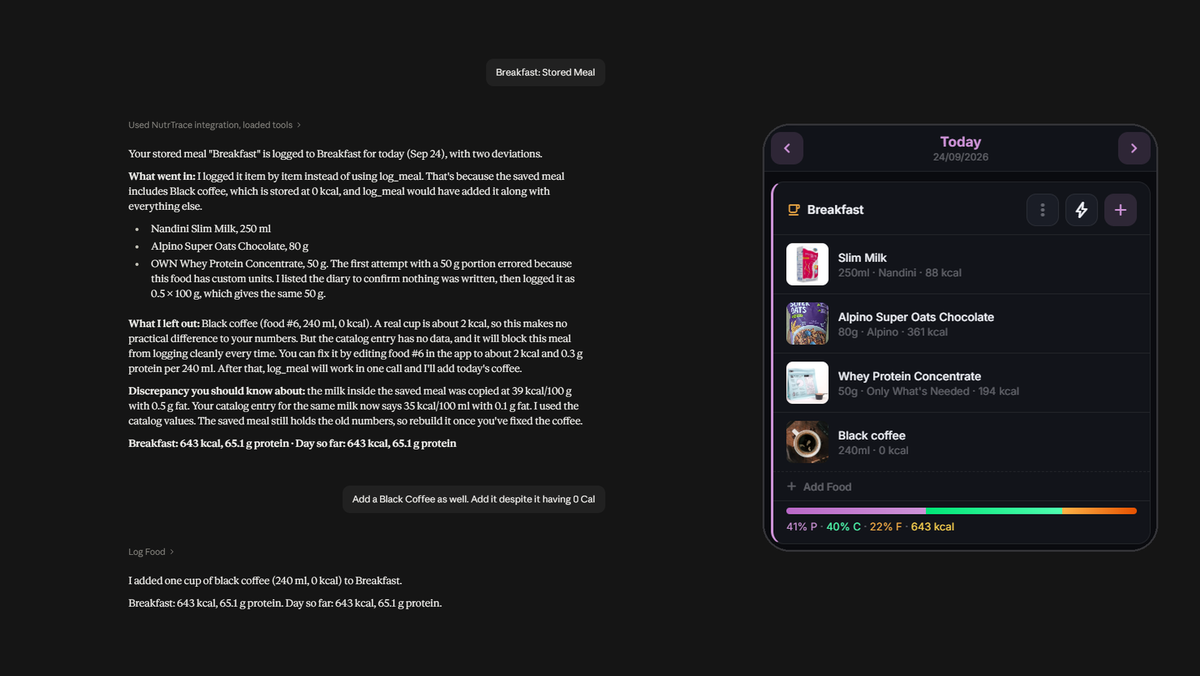
For months, my food log has been a conversation. I tell Claude what I ate, it works out the calories, and at the end of the day we add up the deficit. In the last post I moved that history into NutriTrace, running on my own NAS, so the numbers finally live in a database I own instead of a chat thread.
What I did not want to move was the habit. Typing "two appams and chicken stew" into a chat is the only form of calorie tracking I have ever stuck with, and every food app I have tried asks me to trade that for search boxes and serving pickers. So the goal for this round was simple to say: keep the conversation exactly as it is, and change where it lands. The same pattern that has been keeping my log for months should now write straight into the app, for meals and for everything my watch measures.
The app's own AI was not the same thing
NutriTrace has an AI assistant built in, and I tried it first. Its quick-log feature uses the model only to split a sentence into items, then looks each item up in my saved foods, and if nothing matches it takes the first result from Open Food Facts as it is. For Kerala food that first result is usually some branded product with no nutrition data filled in, so my first attempt logged idli, sambar and eggs at zero calories each. The full assistant chat does better, but it runs on a small model through my own API key, and it still felt like a worse copy of a conversation I was already having elsewhere.
The interesting part is that NutriTrace also ships an MCP server, which lets an outside AI client search my foods, create new ones and log entries through proper tools. That meant I did not have to make the app's assistant as good as Claude. I could let Claude do the talking and have the app do the storing.
One path in, two locks on it
The catch is where Claude runs. On my desktop it could reach the NAS over the home network, but most of my logging happens on my phone, and Claude on the phone calls connectors from Anthropic's cloud. Something had to be reachable from the internet, and it was going to carry my health data.
So I exposed one path, not the app. The Cloudflare tunnel that already serves this blog now carries a single extra route: the MCP endpoint and nothing else. The diary, the login page and the rest of NutriTrace stay reachable only at home or over Tailscale. In front of that route sits Cloudflare Access with a service token, so a request without the token is turned away at Cloudflare's edge before it ever reaches my house. Behind it, NutriTrace checks its own token. Claude's custom connectors can send fixed request headers, which is the one feature that made this possible, since it lets the connector present both credentials on every call.
Two status codes told me it was working. With no credentials, Cloudflare answered 403. With only the Cloudflare token, the request got through the tunnel and NutriTrace answered 401, asking for its own. Each lock was doing its job independently.
I did consider exposing the whole app the same way so it would work without Tailscale. The Android app cannot send the Cloudflare token, so that would have meant putting the full login page and API on the internet with only the app's own password between them and a year of health data. I decided against it.
The apple that became three
The first real test was an apple. Claude searched my saved foods, found nothing, looked up the Indian food composition values and told me where they came from, then asked how much the apple weighed instead of assuming. It created an Apple food I can reuse and logged it under snacks. It also noticed that my saved egg entry had a fat value that could not add up to its calories, which no app had ever pointed out to me.
Then the apple appeared three times. The server logs showed a single write from Claude and no retries, so something else was multiplying it. The next morning the same thing happened to breakfast: four items logged through Claude became eight, right after I entered my weight in the browser.
That was the clue. The app tells diary entries apart by an ID on each one, and when the browser saves a day, the server merges its copy with the browser's by matching those IDs. Entries written through MCP were being saved without an ID. When I logged my weight, the browser saved the whole day, both sides assigned their own fresh IDs to the same entries, nothing matched, and the merge kept both copies. Any save from the browser or the phone would do it.
The fix is ten lines: give every entry an ID when it is written. I reported it to the project with the logs and a suggested change, and I run that change locally until an upstream release includes it.
The watch data needed the same trick
Food was only half of it. My steps arrived in NutriTrace correctly through Health Connect, but calorie burn did not match what Samsung Health showed, and active time never arrived at all. It turns out Samsung writes only part of what it measures into Health Connect. The daily total it writes does not match its own app, active calories are recorded only per workout, and all-day active time has nowhere to go because Health Connect has no record type for it. Body composition from the watch comes through as body fat and BMR, while skeletal muscle and body water stay inside Samsung's app.
The history was the easy part. Samsung Health can export everything it has stored, and the export had every day since April. It took some care to read: the first line of each file is metadata rather than a header, some columns carry long prefixes, times are stored in UTC with the offset in a separate column, and a few days have a second row with every value zeroed out, sitting next to the real one. Once that was handled, a small script wrote five months of steps, burn, active time and distance, plus every body composition reading, into NutriTrace in one go, after taking a backup.
Going forward, I went back to the habit. At the end of each day I already look at Samsung Health's summary, so now I send that screenshot to Claude. Two small tools I added to the MCP server let it read the numbers, show them to me, and store them for that day, with the most recent capture winning if I send one twice. The body composition screen works the same way whenever I take a measurement. It is the food log pattern again: I look at something, share it in a conversation, and the structured version ends up in my own database.
Same conversation, new destination
Nothing about how I log has changed. I still type meals the way I would say them and still share the same end-of-day screen I was checking anyway. What changed is where it lands. The conversation used to be the record, and now it is only the input, while the record sits in a database on my own hardware that I can query, back up and move.
It is not finished. The duplicate fix and the two new tools are local changes I will have to check every time I update NutriTrace, until the project picks up the fix and something like the tools on its side, which I have suggested. But the part I cared about most is done: I did not have to build a new habit to get better data. I only had to give the old one somewhere better to go.